














YEHO / YUI
Make software
feel like yours.
YUI is Yeho’s cross-platform interface framework. Compose screens, shape a theme, connect real behavior, and enjoy making the details your own.
Build your first interface ↓Start with something you can use.
Three small native apps. Complete source. Comments that explain the decisions.
YUI / orbit
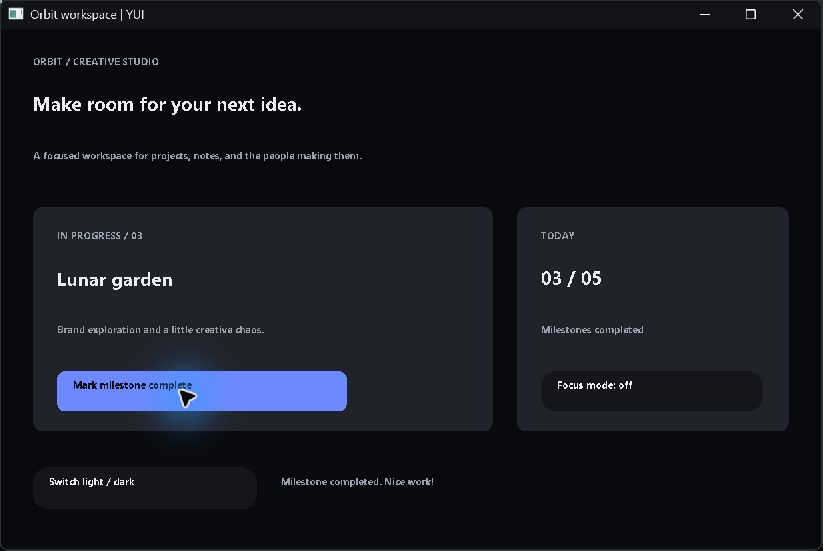
A creative team workspace
Complete a milestone, toggle focus, and switch themes.
Use Tab to focus a control, Enter or Space to activate it, and Escape to close the app. The source shows the pointer and keyboard paths together.
Download all three examples ↓Current Yeho source packages and a C++ toolchain are required. Read README.md in the download before building. These captures are from native Windows execution.
using ui
// A layout is ordinary Yeho data, so code and Atlas edit the same program.
// The factory arguments are: kind, stable id, text, x, y, width, height, tone.
// Keeping layout values literal lets Atlas safely edit exact compiler token spans.
BuildInterface() returns list of yuiDesignElement
{
    list of yuiDesignElement elements=[]
    // A dark workspace for a small creative team's daily work.
    elements.Add(YuiDesignElement("label","brand","ORBIT / CREATIVE STUDIO",32,28,540,24,"muted"))
    elements.Add(YuiDesignElement("title","headline","Make room for your next idea.",32,66,710,44,"normal"))
    elements.Add(YuiDesignElement("label","subtitle","A focused workspace for projects, notes, and the people making them.",32,122,730,26,"muted"))
    // Cards establish grouping. Later elements paint on top of earlier ones.
    elements.Add(YuiDesignElement("card","project","",32,178,460,224,"raised"))
    elements.Add(YuiDesignElement("label","project-kicker","IN PROGRESS / 03",56,202,400,24,"muted"))
    elements.Add(YuiDesignElement("title","project-title","Lunar garden",56,241,400,42,"normal"))
    elements.Add(YuiDesignElement("label","project-note","Brand exploration and a little creative chaos.",56,296,410,24,"muted"))
    // A button has an id; the application maps that id to a real state change.
    elements.Add(YuiDesignElement("button","complete","Mark milestone complete",56,342,290,40,"accent"))
    elements.Add(YuiDesignElement("card","today","",516,178,272,224,"raised"))
    elements.Add(YuiDesignElement("label","today-kicker","TODAY",540,202,220,24,"muted"))
    elements.Add(YuiDesignElement("title","today-value","02 / 05",540,240,220,42,"normal"))
    elements.Add(YuiDesignElement("label","today-note","Milestones completed",540,296,220,24,"muted"))
    elements.Add(YuiDesignElement("toggle","focus","Focus mode: off",540,342,222,40,"normal"))
    // These actions are keyboard reachable too: Tab changes focus; Enter acts.
    elements.Add(YuiDesignElement("button","theme","Switch light / dark",32,438,224,42,"normal"))
    elements.Add(YuiDesignElement("label","status","Ready when you are. Choose a milestone to begin.",280,448,510,24,"muted"))
    return elements
}
Your interface is understandable data.
Start with a panel, title, label, or action. Give it a stable identity. In these freeform examples, the coordinates are explicit Yeho values that Atlas can edit.
One theme, a whole new mood.
The same screen can switch between YUI’s light and dark themes. Surface, text, accent, and focus roles keep colors consistent across its controls.
Make every action mean something.
Stable control ids connect input to application state. The examples complete a milestone, persist preferences, and run a real countdown.
02 / BUILD IT VISUALLY
Drag it. Read it.
Keep the same code.
Atlas reads the compiler’s checked view of your Yeho source. Drop a control onto the UI canvas or move an existing one. The edit changes the source layout and creates one Undo step.
Switch to Logic to inspect its typed inputs and edit text, size, or theme tone. Unsupported expressions remain in source instead of becoming a misleading preview.
Learn the Atlas UI workflow →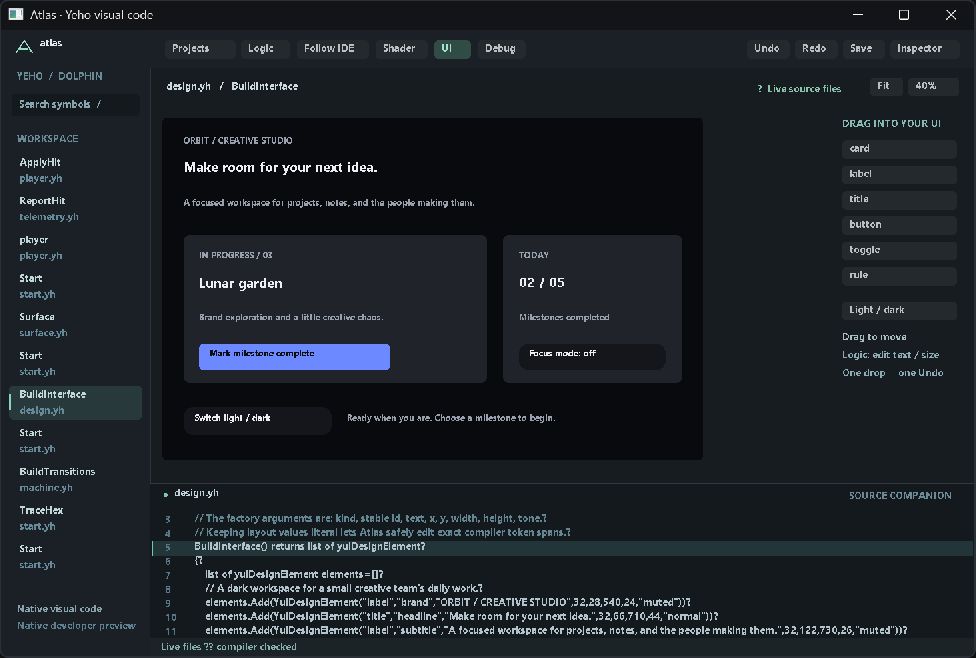
03 / GO FURTHER
From a small screen to a larger UI system.
Freeform composition is one entry point. YUI also has authored .yui surfaces, flow layouts, reusable components, typed state, commands, slots, retained rendering, and semantic accessibility infrastructure.
YUI separates UI meaning from platform providers. The new examples and editor workflow are verified on the Windows CPU reference route; existing Mac work has its own evidence. These freeform demos do not yet expose a complete native accessibility tree, text editing, or responsive flow-layout editing in Atlas.