












Infinite canvases & connected thinkingPublic field guide
Paradox: a local infinite canvas for connected ideas
Paradox brings different kinds of ideas onto one canvas: notes, code, data, tasks, drawings, and relationships. Its current Windows prototype explores a local workspace with an inspectable journal. The value for a team is preserving the context between pieces of work while making each change easier to follow.
Start with a practical evaluation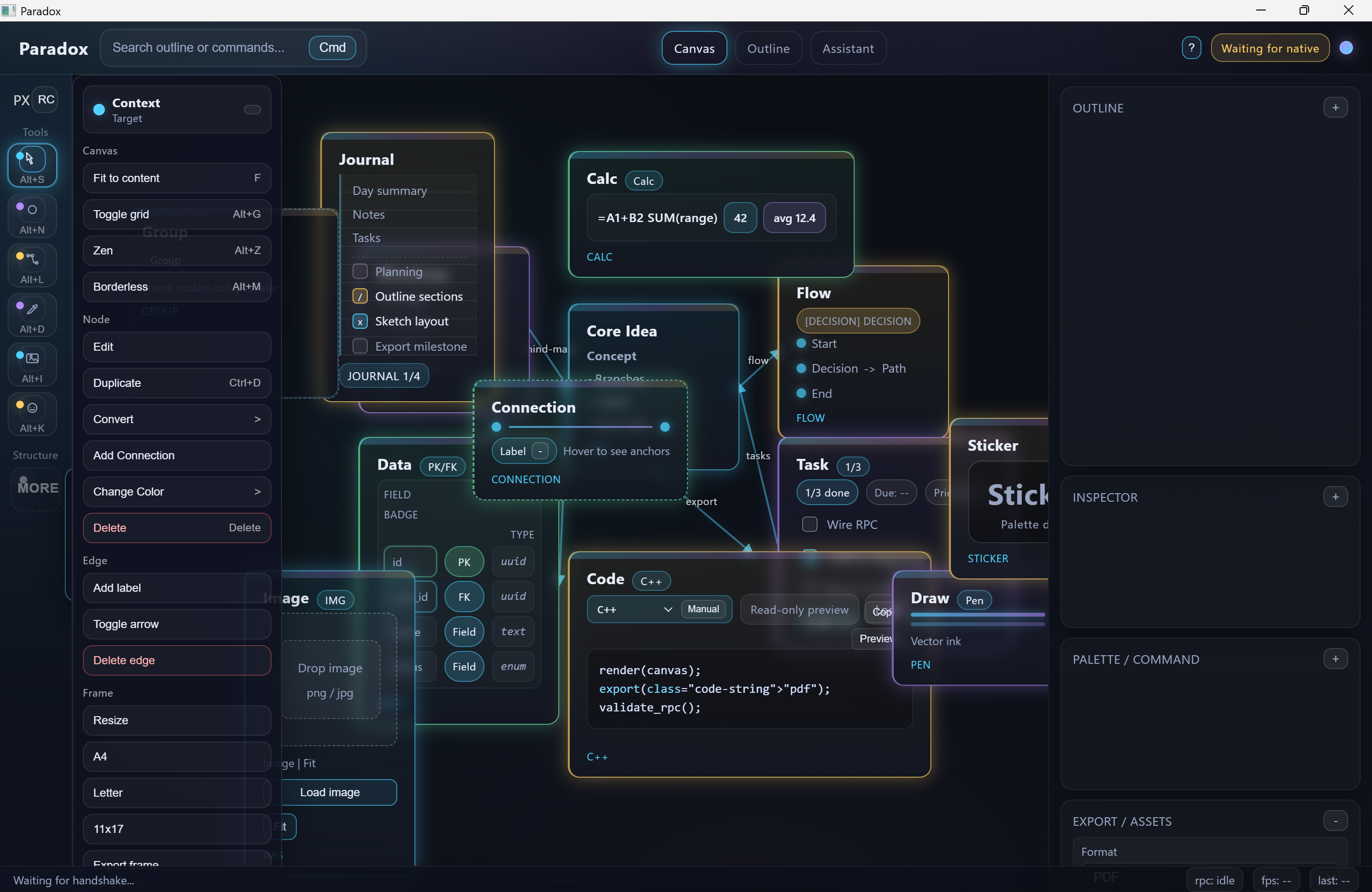
The useful starting point
What Paradox gives your team
A team can keep related material in view and inspect the sequence of edits, rather than reconstructing a discussion from disconnected files and screenshots.
Product teams, researchers, educators, and developers of visual knowledge or planning tools.
- 01
Place the material
Arrange different object types around one concrete question.
- 02
Connect the context
Use relationships and frames to explain how the pieces fit.
- 03
Revisit the changes
Inspect the journal, undo, and recovery behavior.
Keep the relationship beside the content
A note beside the code it discusses is easier to understand than the same note buried in a separate document. Paradox explores that spatial relationship through mixed canvas objects and connections. Frames can give a larger canvas a local purpose, such as a research question or design review.
The useful unit is a coherent piece of thinking, not a huge number of objects. Begin with a small board and see whether a colleague can explain its relationships without a guided tour. That exposes whether the canvas is helping communication or just increasing visual complexity.
A canvas also needs a trustworthy history
Local state and deterministic journal seams make editing behavior available for inspection. A move, connection, or content change should have a defined effect, and undo should preserve unrelated work. This is a practical architecture question for anyone building a visual editor.
The current shell and source include export and AI-sidekick shapes with mock paths. An export smoke or manifest is not evidence that every real canvas is faithfully rendered to every format. Evaluate actual content, text, selection, and recovery in the specific version you receive.
Current public evidence
Working prototype
The native Windows prototype includes a local-only WebView shell, blocked remote navigation, versioned whitelist RPC, mixed canvas objects, deterministic append-only undo/redo, and export/sidekick shapes. Current exports and AI assistance are honest mock manifests, not finished production output.
Explore the project and its evidenceTry one bounded question
Build a small board someone else can understand
A suggested evaluation for your team.
- Place a note, a code excerpt, a task, and a small dataset around one question.
- Connect the related objects and frame the part you want to explain.
- Move and edit several objects, then undo and redo the changes.
- Close and reopen through the documented path and compare the board.
- If evaluating export, compare the produced bytes and visible output with the actual selected content.
A readable board with reproducible edit history and explicitly verified output behavior. Record prototype or mock paths so they cannot be mistaken for finished export capability.
Before you go further
Common questions about Paradox
Is Paradox a cloud collaboration product?
The current public evidence describes a local-first Windows prototype. It does not establish a deployed multiplayer collaboration service.
Are the canvas exports production ready?
That is not established by the current mock and smoke paths. Test the actual output for your canvas, format, fonts, and selection scope before relying on it.
Why use a journal for an infinite canvas?
A journal makes changes explicit and supports repeatable undo and redo. It gives engineers a way to inspect how the workspace arrived at its current state instead of treating the picture as the only source of truth.
From an idea to your first evaluation
Build on what you understand.
Start with Paradox's public evidence. If it fits your team's problem, compare source memberships or tell us what you would like to evaluate.
These guides are free to read. Private source releases follow the membership license. Compare plans and team seats.