
















Native application developmentPublic field guide
Yeho: native programming, YUI, and visual code
Yeho brings a programming language, native compiler, interface system, and visual editing workspace into one connected project. For a team exploring a new application foundation, the useful question is concrete: can we build, understand, and change a small real program without losing sight of how it works?
Start with a practical evaluation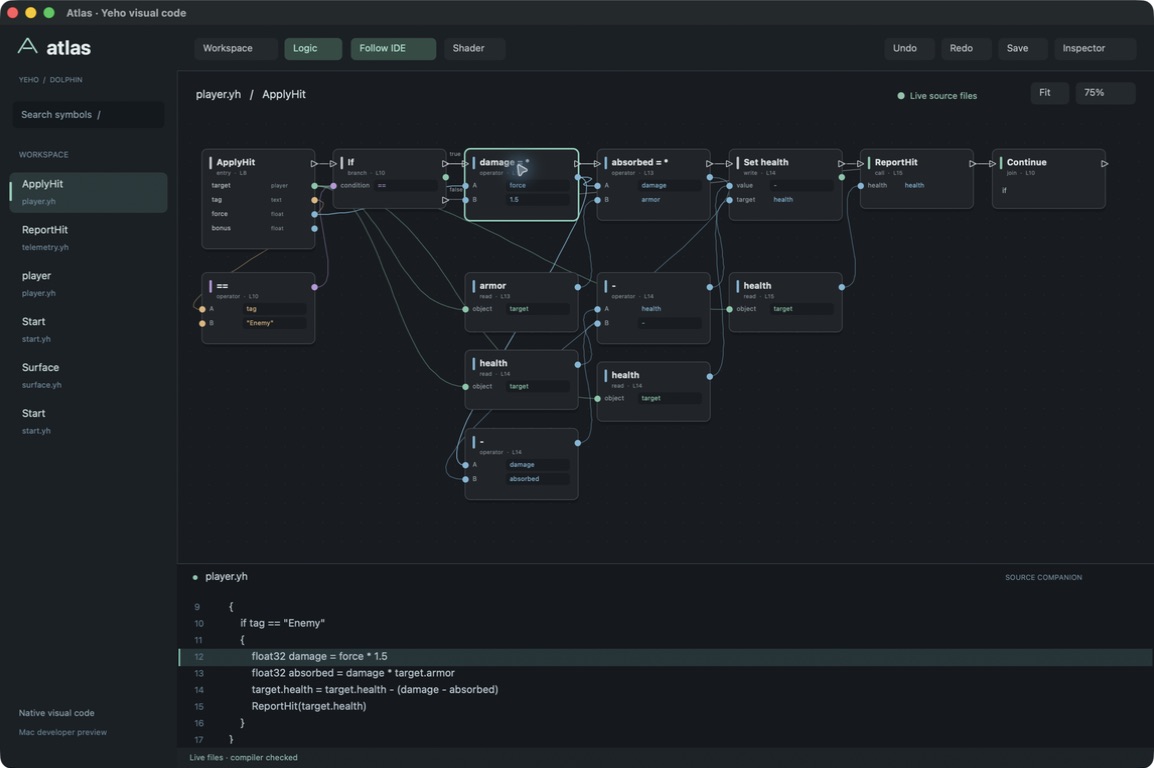
The useful starting point
What Yeho gives your team
Your team can examine the language, compiler, and interface layers together, then adapt the layer that actually limits the application.
Software teams, tool builders, and researchers exploring native applications and visual programming.
- 01
Express the idea
Write Yeho logic and describe the interface in YUI.
- 02
Check the meaning
Kyber checks the program before it writes the native program.
- 03
Run and inspect
Exercise the application and follow its behavior back to source.
One language, several ways to work
Yeho source describes the program. Kyber, the compiler written in Yeho, checks it and writes the native program itself, with no C++, assembler or linker in the route; it also writes GPU kernels for Vulkan and CUDA.
YUI describes retained interfaces: controls, layout, interaction, and rendering. Atlas provides a visual view of real Yeho operations and typed connections. These are connected ways of working with a program, rather than a promise that every program can be built by dragging boxes.
Choose a demonstrated target
The published Starter Pack targets Windows x64. Kyber also builds Linux x64 and Linux ARM64 programs from the repository; Windows ARM64 programs are written but not yet run on a machine. Atlas also has a documented Mac developer preview using the explicit CPU-oracle/AppKit route. That preview does not establish a Mac Kyber SDK. Pick the exact compiler, libraries, operating system, and release before evaluating an application.
The public handbook is the best starting point for syntax, supported features, and small examples. The marketplace adds complete example projects. Reading them is useful before licensing the private repositories or deciding how much of an existing application to move.
Current public evidence
Windows x64 product · Linux x64 and ARM64
Kyber is written in Yeho (about 33,900 lines) and writes Windows x64 programs itself, with no assembler or linker; the C++ compiler is retired. Talk's dashboard, 1.38 million graph nodes, builds in 2.4 to 2.6 s on frozen sources, from about 45 minutes on the old compiler, and the running compiler serves an edit in about 0.6 s. Hello Moto's game builds in about 12 s, down from 70. Kyber writes GPU kernels as SPIR-V and PTX, NVIDIA machine code, and code for the Intel UHD 770, and drives Vulkan and CUDA directly. Seventeen float32 math functions are correctly rounded and give the CPU's exact bits on CUDA, Vulkan on the RTX 4070 and the UHD 770, and the chip models. 3-D draws through Vulkan's own pipeline on both cards. Omni, our own GPU stack, draws the test triangle on a simulated UHD 770 with the same image hash as the CPU, Vulkan and CUDA; its first run on the real chip is planned. Linux x64 and Linux ARM64 programs run (ARM64 checked on Google Cloud Axion); Windows ARM64 programs are written but not yet run on a machine, and macOS has no route. Against gcc -O2, Kyber wins two probes, is 1.2x to 2.6x slower on game code and most others, and 5x to 35x slower on list loops, integer maps and alias arguments: that is the open work.
Explore the project and its evidenceTry one bounded question
Build one window with one useful interaction
A suggested evaluation for your team.
- Start with a public native-window example and read its prerequisite instructions.
- Add a counter or a small calculation with a visible result.
- Resize the window, repeat the action, and close it while work is active.
- Introduce a deliberate type error and inspect the diagnostic.
- Record the compiler and SDK version, build command, and observed behavior.
A reproducible native program whose input, state, drawing, and shutdown your team can explain. Then evaluate a real application requirement on the same toolchain.
Before you go further
Common questions about Yeho
Is Yeho a visual programming language?
Yeho is a source language. Atlas adds a visual editing surface for supported real Yeho graphs, while the source remains part of the workflow. Visual editing and ordinary code are related views, with explicitly bounded current support.
Can I explore Yeho before becoming a member?
Yes. The language handbook, YUI guides, API reference, and marketplace examples are public. Follow each sample's own license and prerequisites. Private repository releases use the separate membership license.
Does the benchmark prove every program will be faster?
No. The retained counted-loop benchmark measures one workload on a named machine. Application performance depends on the code, data, compiler, and runtime path. Measure the workload your team actually needs.
From an idea to your first evaluation
Build on what you understand.
Start with Yeho's public evidence. If it fits your team's problem, compare source memberships or tell us what you would like to evaluate.
These guides are free to read. Private source releases follow the membership license. Compare plans and team seats.