

















Windows disk-space visualizationPublic field guide
HD Space Map: visualize Windows disk space before cleanup
HD Space Map turns storage use into a picture. Its Windows interface combines a treemap with a largest-item view, helping a person understand where space went before deciding what to remove. It is a practical utility and an inspectable starting point for teams building storage-management tools.
Start with a practical evaluation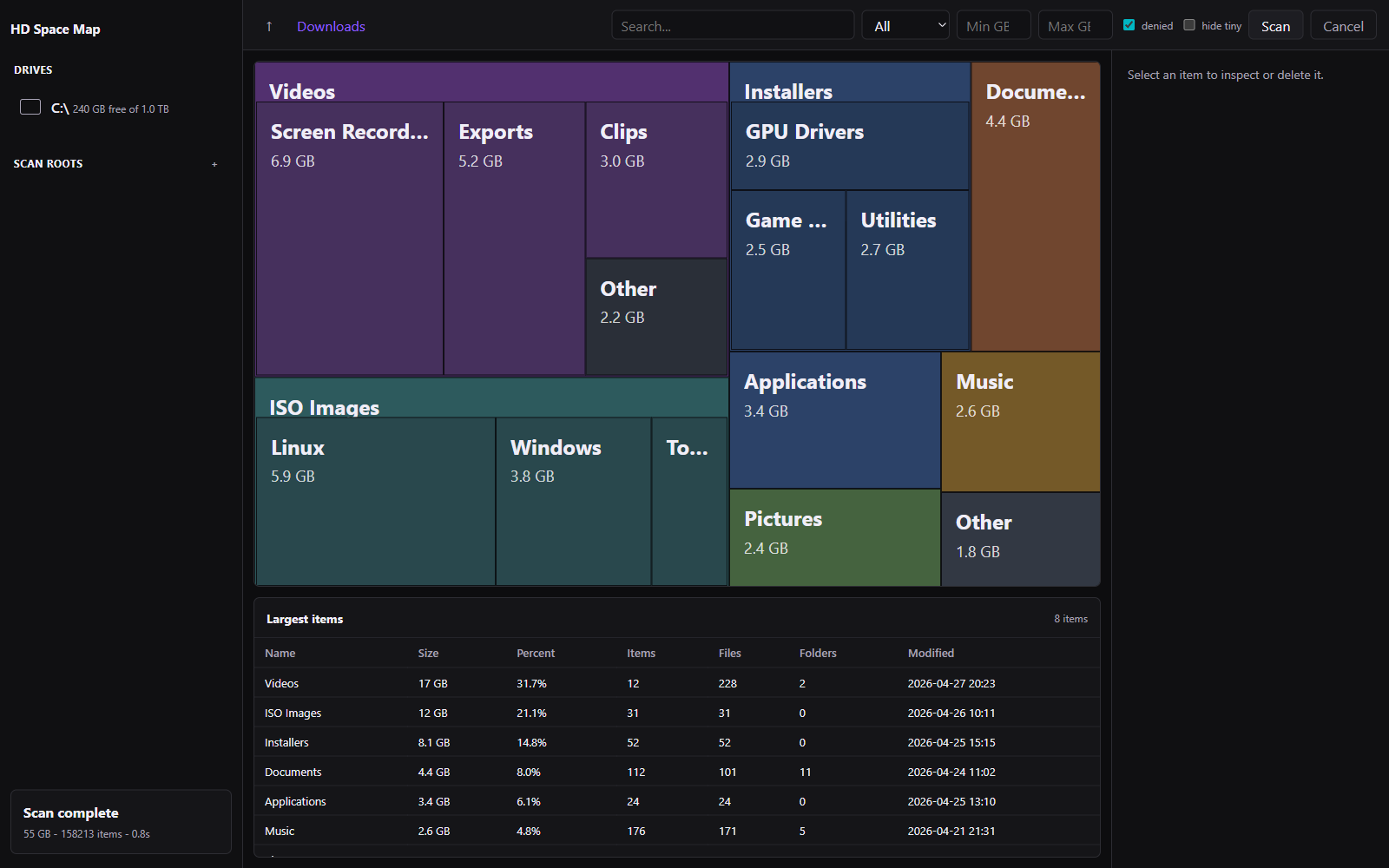
The useful starting point
What HD Space Map gives your team
People can connect a large visual block to a real location, inspect its contents, and make a specific cleanup decision instead of guessing from a nearly full drive warning.
Windows users, IT support teams, and developers who need a clearer explanation of local storage use.
- 01
Scan a location
Let the background scan build a view of the selected storage.
- 02
Find the cause
Compare the treemap with large items and drill into a folder.
- 03
Choose an action
Inspect the exact path and use the appropriate cleanup option.
Read the map before changing the drive
A treemap gives large files and folders a visible share of the available space. The largest-item feed provides another entry point, so a person does not have to wait for every part of a scan to finish before spotting an obvious candidate for inspection.
The picture explains size, not value. A large database, development archive, or recording may be important. Open the context and identify the owner of the data before treating a large rectangle as disposable.
Make cleanup an explicit decision
The current utility uses the Recycle Bin as its default deletion route and requires stronger confirmation for permanent removal. Protected-location checks and explicit frontend confirmation provide additional boundaries. Those controls belong alongside a user's understanding of the selected path.
For an organizational evaluation, include locked files, permissions, links or junctions, and partially scanned folders. A readable failure matters: the interface should explain that an action was blocked or incomplete rather than making the space appear reclaimed.
Current public evidence
Verified utility
The scanner streams files at least 1 GiB into view immediately, keeps the interface responsive, caches a warm tree in SQLite, skips protected Windows locations, and measured roughly 31,000 files per second on its 5,000-file synthetic benchmark.
Explore the project and its evidenceTry one bounded question
Map a disposable folder with known contents
A suggested evaluation for your team.
- Create a dedicated test folder with several known-size disposable files.
- Scan only that folder and compare the map and largest-item list with its contents.
- Check that the interface remains responsive during scanning.
- Move one disposable file to the Recycle Bin and verify both the file state and updated view.
- Include a locked test file and inspect the reported failure without using valuable data.
A clear match between known files, displayed storage, and the exact result of the requested action. Any scan-rate result should name the dataset and machine.
Before you go further
Common questions about HD Space Map
Does the largest file automatically mean it should be deleted?
No. The map explains storage consumption. The person still needs to identify the file's purpose, owner, retention needs, and recovery path before choosing removal.
Which platform is the current utility for?
The documented implementation is a Windows desktop application using WebView2. Evaluate the actual Windows environment and release prerequisites.
Does the scan benchmark predict performance on every drive?
No. The published measurement uses a synthetic dataset. Real performance depends on the filesystem, drive, permissions, file distribution, and cache state.
From an idea to your first evaluation
Build on what you understand.
Start with HD Space Map's public evidence. If it fits your team's problem, compare source memberships or tell us what you would like to evaluate.
These guides are free to read. Private source releases follow the membership license. Compare plans and team seats.